Painting our code-built props with open models
Qwen-Image-Edit repaints, TRELLIS.2 paints our own meshes, and what still needs work
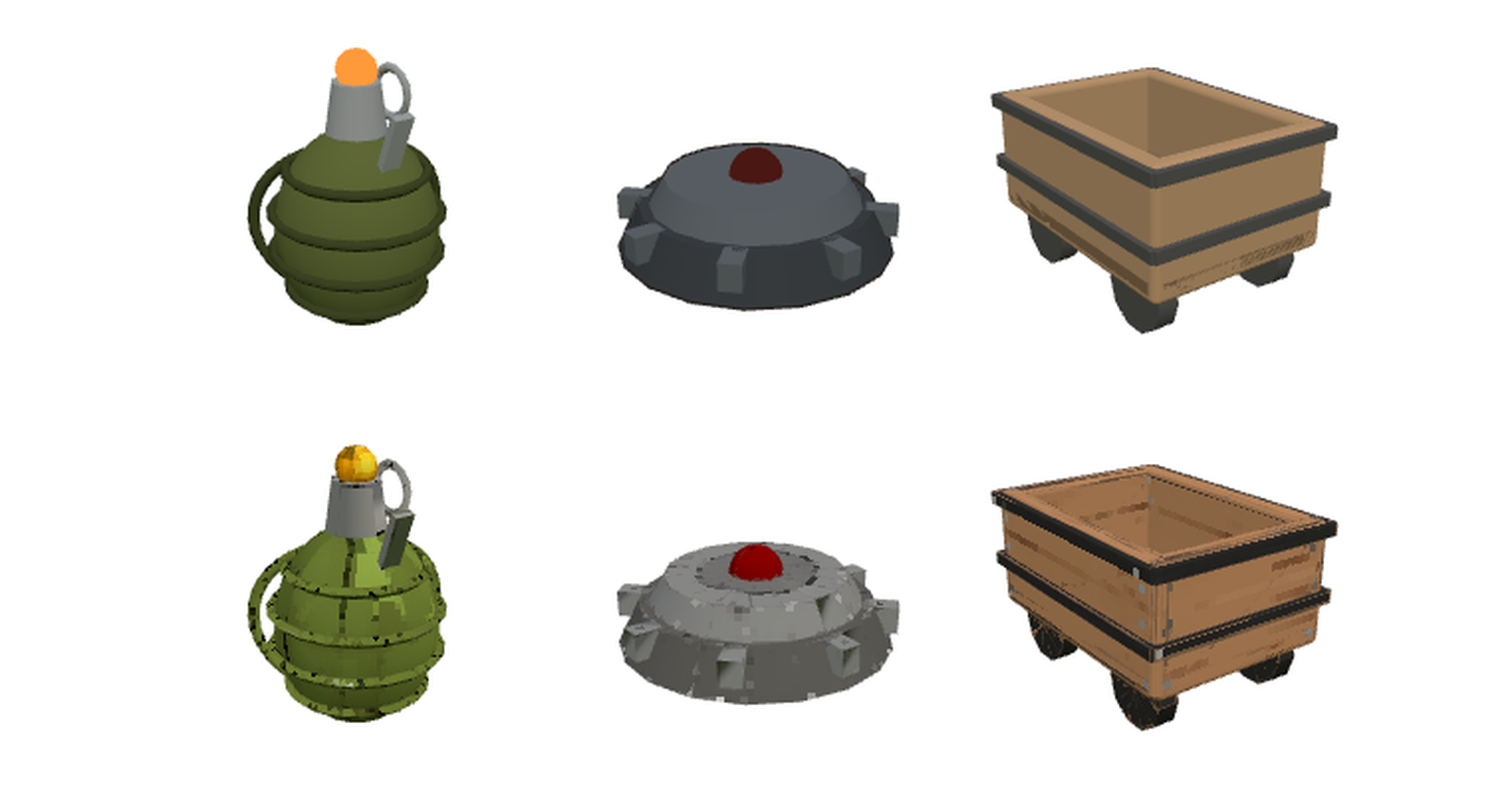
Most of Materia's gear is built in code. The grenade, the mine, the rocket, the drone, the minecart, the bazooka and the sword are each a few dozen lines of three.js: spheres, boxes, cylinders and tori, each with one flat colour. The shapes read well at game distance. The surfaces have nothing on them, though. Next to the pixel-textured props we brought in from an open asset pack, they look like placeholders.
We want many more assets, so this was a day-long experiment. Could open models give those code-built props a proper surface without changing what they are? We kept to open weights (MIT and Apache-2.0) running on our own GPU box, with no paid generation API.
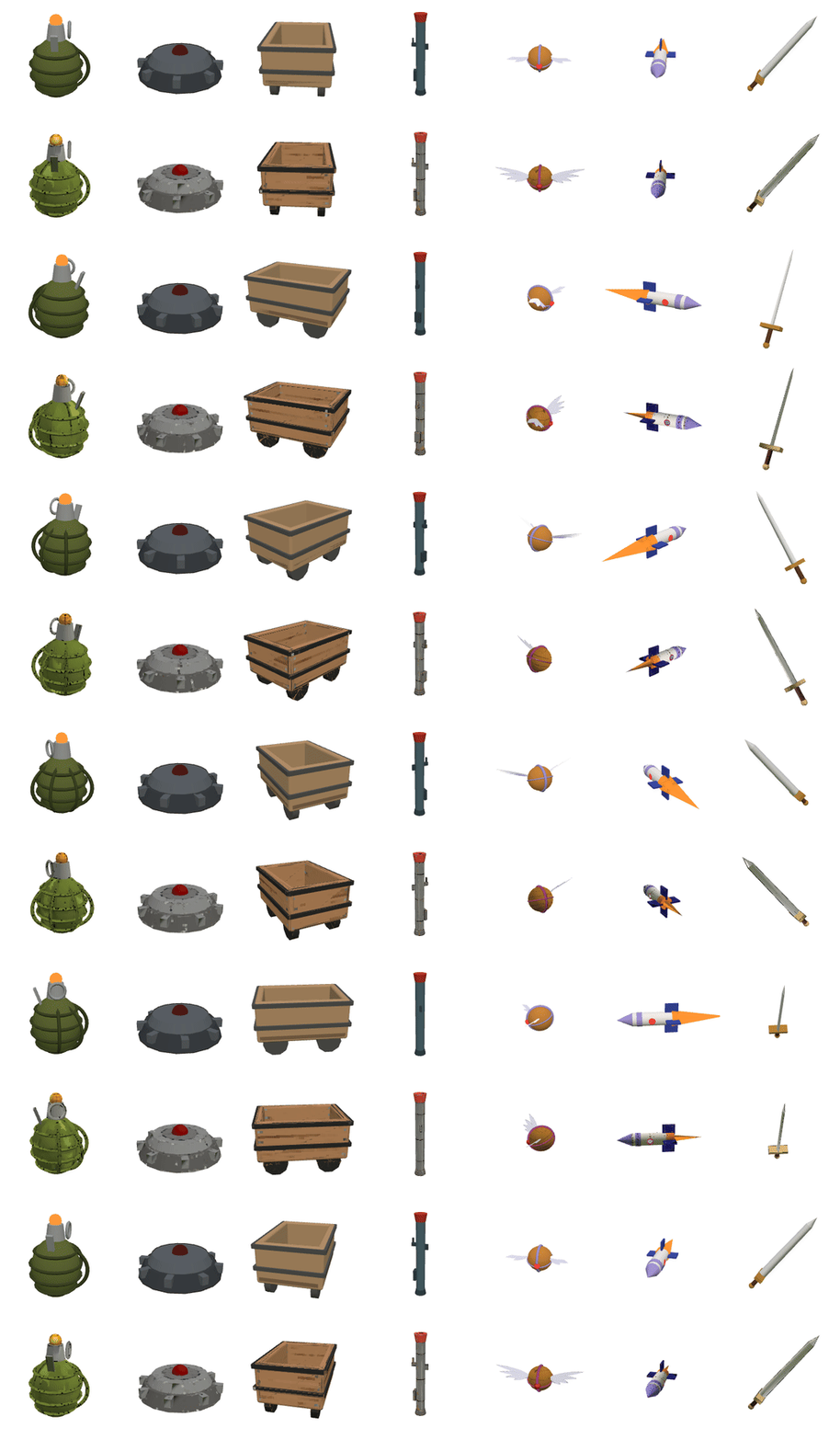
Top: the props as they are in the game today. Bottom: the same meshes after the pipeline below. None of this is in the game; it's research.
Five ways to try it
We ran five approaches on the same seven props.
- A. Procedural pixel paint, in code. Each part gets a 16 px texture made from its own colour: three shades of jitter, a darker rim and a lit edge, drawn with nearest filtering. It costs nothing and every prop gets it at once. It also reads as generic Minecraft noise.
- B. Repaint the render with an image model. We render the code model on white and give it to Qwen-Image-Edit-2511 (Apache-2.0, 4-step Lightning LoRA) with one instruction: keep exactly the same shape, colours, camera, and add a hand-painted retro texture. The results were surprisingly faithful: rivets on the mine, planks on the cart, a lever plate on the grenade. It is only one 2D image, though.
- C. Paint our own mesh from that image. TRELLIS.2 (Microsoft, MIT) has a texturing pipeline as well as its image-to-3D one: it takes an existing mesh plus a reference image and paints the whole mesh. We export the code model's geometry, hand it over with the repaint from B, and get our mesh back, unchanged down to the vertex, painted all the way round, back included.
- D. A new mesh from the image. We gave the same repaint to TRELLIS.2's image-to-3D. It came back lumpy, and thin or open shapes fell apart (the mine's ring, the sword).
- E. Voxels. We voxelized C at 32³ with a 24-colour palette. It has a nice block-world grain, but the small parts (the pin, the lever) disappear.
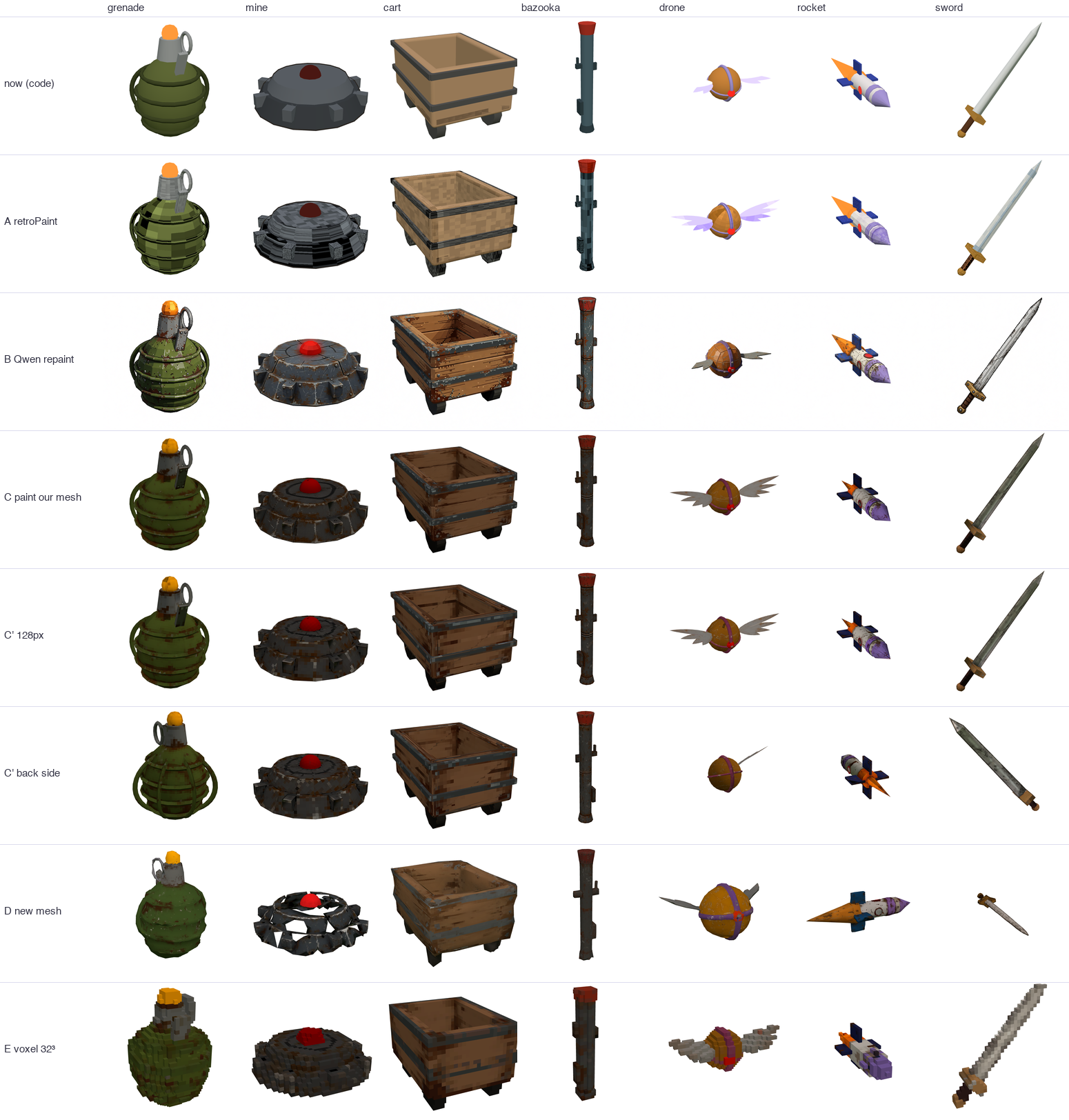
C clearly won. The design stays ours, because the code model is still the source of truth. The models only add surface.
Two kinds of colour drift
The first C results came out grimy and dark. The rocket's white turned dirty, the drone's lavender wings went grey, and the sword went charcoal. There were two causes:
- The prompt. We had asked for wear, scratches, grime, and the model applied them to everything. A second prompt fixed most of it. It asks for seams, rivets and painted highlights, says white stays white, and allows only light wear on the sharpest edges.
- The 3D bake. Even with a clean repaint, TRELLIS.2 bakes darker than the image it was given. We compared the repaint with a render of the painted mesh from the same camera, and the shift fits a gamma of 1.42 to 1.85. That matches the 1.45 we measured on another open 3D model last week. One
tex^(1/1.45)pass on the texture brings the colours back close to the repaint.
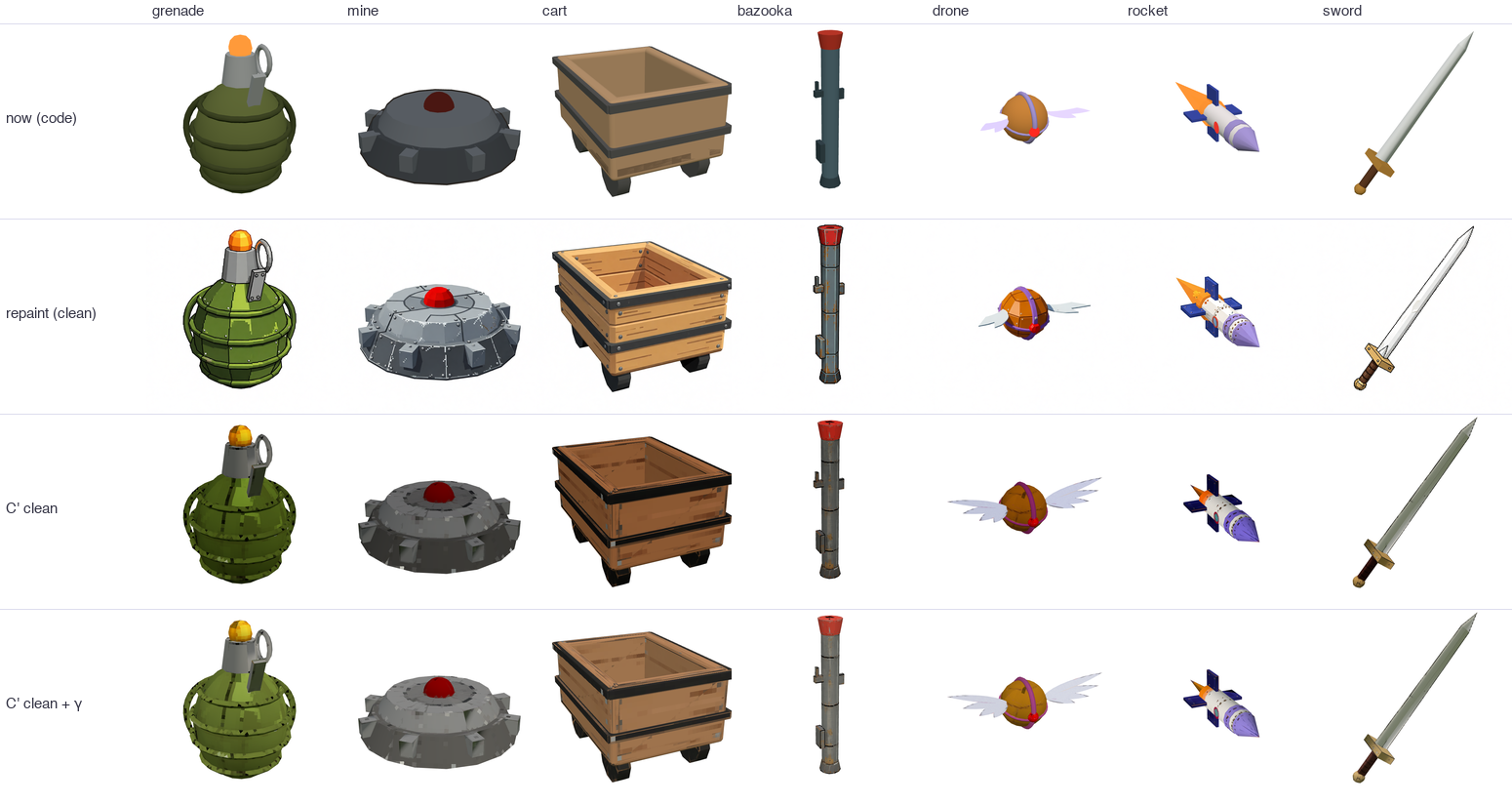
Rows: code model, clean repaint, painted mesh, painted mesh with gamma fixed.
How many pixels?
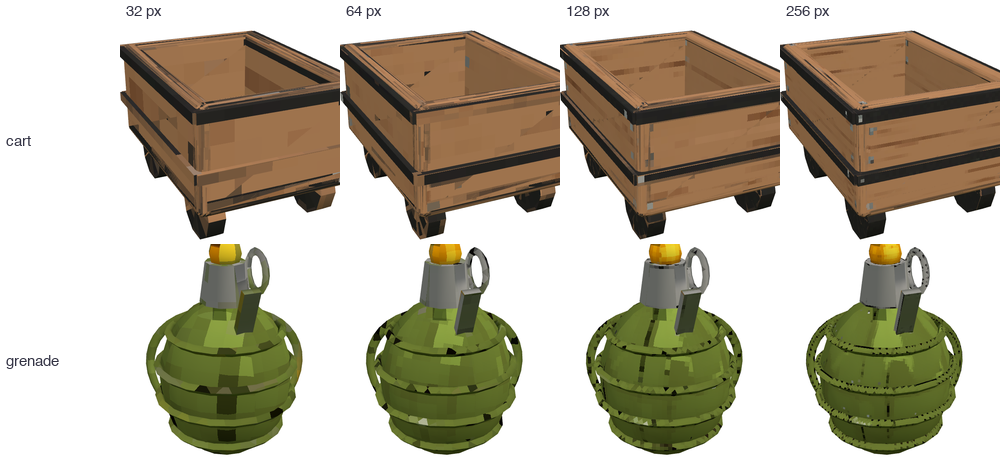
Baking the texture small is what makes it look retro, so we swept the size. At 32 px the paint smears across UV islands, and at 64 px it is blotchy. 128 px reads as a hand-made pixel texture. 256 px is barely different from 128 px, so we use 128.
Did it work?
Fruitful, but not ready to ship. The good parts:
- It takes about a minute per prop on our GPU box, from code model to painted GLB.
- It uses only open weights: Qwen-Image-Edit (Apache-2.0) and TRELLIS.2 (MIT).
- Our shapes come out untouched, so a prop's design stays in code and the paint is a pass on top.
What still needs work:
- Seam specks. Nearest filtering shows the UV-island edges as dark or light dots, which you can see on the grenade's rings and the cart's bands. The bake needs edge padding.
- Detail softens. The repaint draws crisp plank lines and rivets, and TRELLIS.2 blurs them. The repaint is a single view. Two or four repainted views, or projecting the repaint straight onto the faces it can see, should keep more of it.
- Thin parts. The drone's feathers and the rocket's flame come back pale and washed out.
- Per-prop colour. One gamma for every prop is close but not exact. Better would be matching each prop to its own code palette.
Next we'll try padding and multi-view repaints. If the cart's planks survive the trip into 3D, this becomes how a code-built prop gets its paint in Materia.
Comments
Join the discussionNo comments yet. Be the first to comment.